

Self-Service Portal
A customer portal,
not your inbox.
Corso's Order Hub is a single branded portal where customers track shipments, start returns, file warranty claims, report shipping issues, edit orders, and cancel orders. All embedded on your site. This page covers the full customer-facing experience: portal customization, order lookup, the guided claim flow, shipping and label logistics, order editing, gift returns, and lifecycle emails.
The Hub
One portal for every post-purchase action.
Most returns tools give customers a returns form. Corso gives them the Order Hub: a single branded surface embedded on your site where every post-purchase action lives. The customer looks up their order, and everything they might need to do is right there.
Order Hub
One portal. Every action.
Returns
Returns & Exchanges
Start a return, select items, choose a resolution, upload media, get a shipping label. The full guided claim flow all within the same portal.
Tracking
Order Tracking
Real-time shipment status embedded on your site instead of redirecting to carrier pages. Estimated delivery dates where configured.
Warranties
Warranty Claims
File warranty claims from the same portal. When both a return and a warranty are eligible, the customer is given the right choice.
Shipping Issues
Shipping Issue Reporting
Report lost, damaged, missing, or stolen shipments directly from the tracking experience. Claim entry points are embedded in the order view.
Order Edits
Order Editing
Pre-fulfillment order changes, for address corrections and order cancellations. Available during the merchant-configured edit window.
Why unification matters: When tracking, returns, warranties, and order editing live in separate tools, customers get confused and email support asking "where do I go?" A unified portal eliminates this. The customer looks up their order once, and every available action is right in front of them. This translates to fewer support tickets, one brand experience to maintain, and one URL to point customers to.
Customization
A portal that looks and sounds like your brand.
The customer never sees "Corso" unless you want them to. The portal lives inside your site, speaks in your voice, and ships email from your domain.

Portal Theme Customization
Brand color, logo, background image or color, favicon, and footer text. The portal adopts the merchant's visual identity. No CSS overrides needed for basic branding. It's configuration, not code.
Program Naming
Rename "Returns," "Warranties," "Guarantees," and other customer-facing terms to match your brand language. A brand that calls returns "Exchanges & Credits" can relabel the portal accordingly.
Portal Text
Descriptions, success states, error messages, and expired-window text are all merchant-controlled, matching your brand's voice. Also there for cancellation descriptions, update confirmations, and expired-window copy.
Shopify App Block
Add the Corso portal to any Shopify page template as an embedded app block. The portal renders inside the merchant's existing site layout (header, footer, navigation are the merchant's own). No redirect, no popup, no separate domain.
Headless Embed Script
For merchants on headless storefronts (Hydrogen, custom builds), a script tag and container renders the portal on any page. Tracking deep links can preload a specific order so you can send out links that navigate directly to the order, all pre-loaded.
Brand-Domain Email Delivery
Lifecycle emails (return submitted, return reminder, return expiring, claim approved, claim denied, needs-more-info) can be sent from the merchant's domain. Custom sender name, reply-to address, SPF/DKIM authentication. Integrate with your messaging provider.
Klaviyo & Sendlane integration: For merchants who want full control over email design, Corso syncs claim and shipment events into Klaviyo or Sendlane. Rebuild any Corso email as a branded flow in your email platform. Order Shipment Update events (in transit, out for delivery, delivered) enable tracking-triggered email sequences.
Tracking
Quick lookups, never leaving your site.
Customers find their order with an order number, email, postal code, tracking number, or gift lookup. Real-time shipment tracking is embedded in the portal with no carrier redirects, and no account login required.
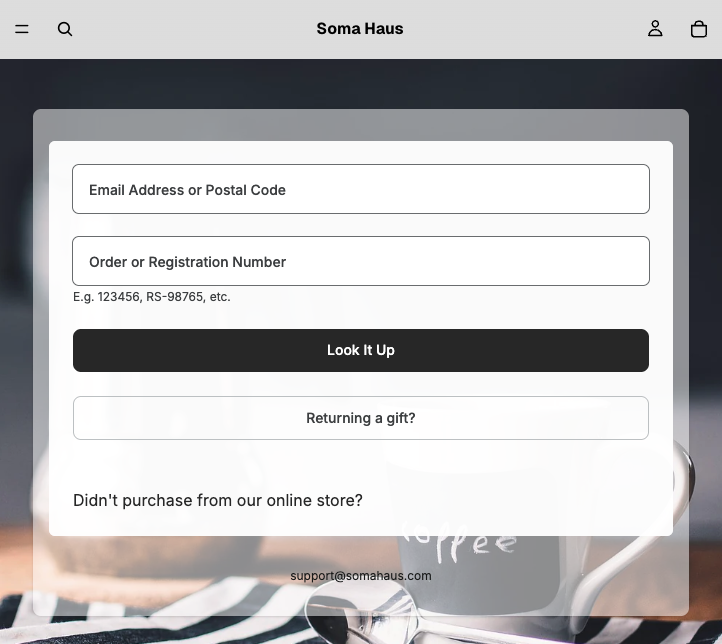
Branded Embedded Tracking
Shipment tracking lives inside the Corso portal on your site. Customers see real-time statuses (in transit, out for delivery, delivered) without being redirected to UPS, FedEx, or USPS tracking pages.
Tracking on your domain → no carrier redirects
Estimated Delivery Dates
Delivery date ranges display within the tracking experience. Also available in shipping-rate descriptions and checkout widgets for pre-purchase transparency.
Est. delivery: May 22–24
Tracking Deep Links
The portal can preload a specific order in a link. Lifecycle emails and SMS messages send the customer directly to their order status, no lookup step required.
Email link → preloaded order, no lookup
Real-Time Status Updates
Live statuses update as the carrier scans the package: order confirmed, shipped, in transit, out for delivery, delivered. Integrated with the order detail view, not a separate tracking page.
Carrier scan → live status update
Actions surface from the tracking view
The tracking view shows contextual action buttons based on eligibility. "Report a shipping issue" appears when a shipment is delivered or overdue. "Start a return" appears when the return window is open. "Edit order" appears when the order is still editable. The customer doesn't navigate away, the actions come to them.
Claim Flow
A guided flow that handles the complexity.
The customer selects items, picks a reason, uploads media if required, answers conditional questions, chooses a resolution, and reviews the financial summary. Every step is configurable, driven by the automation rules engine.
Item Selection
Select items to return. Each shows eligibility status: eligible for refund, exchange, store credit, or ineligible with the reason shown.
Final sale items, expired windows, and excluded SKUs are labeled clearly.
Return Reason
Reasons organized into Reason Groups with optional details. Product- and claim-type-specific menus ensure customers see only relevant reasons.
"Wrong size" → "Too small" / "Too large" / "Doesn't match size chart"
Media Upload
Photos or videos required before submission. Configurable per product group, return reason, or claim type. Only shown when visual evidence matters.
Driven by Collect Additional Information automation rules.
Custom Fields
Structured questions, acknowledgements, and upload requirements shown conditionally. Policy-Enforcing Questions gate eligibility: wrong answer = ineligible.
"Has the item been worn?" → Yes = ineligible
Resolution Selection
Choose between exchange, Shop Now, store credit (with bonus), or refund. Each shows financial terms: free shipping, bonus credit, fees, or deductions.
Incentives make exchange and credit paths naturally better value.
Claim Summary
Itemized financial breakdown before confirming: credit, bonus, deductions, fees, exchange price difference, net amount. Nothing hidden, nothing estimated.
The exact financial outcome, visible before submission.
When both paths are valid: If an item is eligible for both a standard return and a warranty claim, the customer sees a clear choice ("Return this item" or "File a warranty claim") with descriptions of what each path means. The customer picks the appropriate path; the system routes them into the correct flow. No guessing, no wrong doors.
Claim Summary, before submission
The Claim Summary shows every financial detail before the customer confirms. Return credit, bonus incentive, exchange price difference, fees, and deductions are all visible.
The customer sees exactly what they'll receive or owe. No surprises after submission. The summary adapts based on the resolution type, incentive configuration, and fee automation rules.
Shipping
Labels, packing slips, and returnless options.
After a claim is submitted, the customer needs to know how to send the item back, or whether they need to send it back at all. Corso generates prepaid labels, packing slips, or QR codes based on automation rules.

Prepaid Return Labels
Generated automatically after claim submission (or after manual review). The customer receives the label in-portal and via email. Carrier, rate, and destination are determined by Return Shipping Policy automation.
Packing Slips
For merchants who prefer customer-paid return shipping. The customer uses their own shipping method and includes the packing slip. Useful for international returns or cost-controlled policies.
QR Codes
QR code return labels for carrier drop-off locations. No printer needed. The customer shows the QR code at a supported drop-off point and the carrier handles the label.
One-Click Labels
One-click return label generation to a default location. Simplifies the experience for merchants with a single return warehouse. No per-claim configuration. Default address, lowest rate.
Charge for Return Label
When configured, the customer sees the return label cost on the Claim Summary before submitting. The charge can be the actual carrier rate, a fixed amount, or a marked-up rate. Exchanges might get free labels while refunds are charged.
Returnless Refunds
For items where return shipping costs exceed product value, Keep Item lets the customer keep the product and still receive their refund or credit. No label, no shipping. Conditioned by line-item value, product group, or custom rules.
Free Returns + Shipping Protection bundles: Merchants can offer free return shipping funded by checkout protection revenue. The customer sees "Free returns" as part of the delivery guarantee value proposition. Return shipping is covered by the protection they opted into at checkout. The merchant doesn't absorb the cost; the protection program funds it.
Return expiration: After a label or packing slip is generated, the customer has a configurable number of days to drop off the item. If the window expires without a carrier scan, the claim can be auto-closed or flagged. This prevents indefinitely open claims from accumulating.
Gift Returns
Private, respectful, and designed for the recipient.
"I received this as a gift and I need to exchange it." Gift recipients initiate returns privately in the same portal, without the purchaser being notified. No purchaser email, no order number, no account login. They look up the gift directly and the right resolution paths surface.
Gift-Specific Lookup
Recipients look up orders using gift-specific lookup data configured by the merchant. No purchaser email, order number, or account required.
Private to the Recipient
The purchaser is not notified that the gift is being returned. The recipient initiates the return, selects a resolution, and handles shipping. The gift relationship is respected throughout the process.
Recipient-Appropriate Resolutions
Gift returns offer exchange and store credit. Refund to original payment method is not available since the recipient isn't the purchaser. The recipient picks a different item or takes store credit.
Built for sensitivity: Gift returns are an emotionally specific scenario. The recipient didn't choose the item, they may not know the price, and they don't want the gift-giver to feel bad. Corso's gift return flow is designed around this sensitivity: private, respectful, and focused on getting the recipient something they'll use.
Next Steps
Continue exploring.
Exchanges & Revenue Retention
Shop Now, Instant Exchanges, Advanced Exchanges, incentive mechanics, Returns Ledger
Automation & Workflows
Rules engine, cookbook recipes, claim processing workspace, eligibility controls
Fraud & Risk Protection
Claim Risk scoring, serial returner detection, cross-claim visibility
Returns & Exchanges
Full overview of Corso's returns and exchange capabilities
See the portal with your brand.
Book a demo to see the Corso portal configured with your logo, your colors, your products, and your return policies. The same portal powers delivery guarantee claims, warranties, and registrations.