

Fraud & Risk Protection
See the pattern,
not just the claim.
Corso's Claim Risk engine scores every claim using email behavior, device fingerprints, IP patterns, media reuse, and historical claim data. It does this across returns, warranties, and shipping claims on one platform. Suspicious claims are flagged automatically, and risk scores feed directly into the automation rules engine for routing, gating, and review.
The Problem
Normal in isolation. Fraud in context.
A single fraudulent return often looks just like a legitimate one. The fraud becomes visible in patterns: the same customer filing claims across multiple orders, the same device submitting claims under different emails, the same photo uploaded to different claims. Without AI-driven, automated pattern detection, your team catches fraud by accident or not at all.

Serial Returners
Customers who repeatedly file returns at rates above normal. They use the product and return it, order knowing they'll return most items, or abuse generous policies. The pattern is only visible when you look across the customer's full claim history.
Blind spot: Only visible with aggregated claim history across orders
Media Reuse
The same photo or video submitted across multiple claims, even across different orders and different customer accounts. Often indicates a fabricated return reason staged once and reused.
Blind spot: Only visible with cross-claim media analysis
Device & IP Clustering
Multiple customer accounts submitting claims from the same device or IP address. Suggests one person operating multiple accounts to avoid serial-returner detection.
Blind spot: Only visible with device fingerprint and IP analysis
Cross-Claim Escalation
A customer who starts with shipping claims, progresses to return claims, and then files warranty claims. Each is low enough in isolation to fly under the radar. The escalation pattern is only visible when all claim types live in one system.
Blind spot: Only visible when returns, warranties, and shipping claims share one platform
Cross-Claim
Fraud signals that returns-only tools can't see.
Unlike other tools, Corso sees return history, warranty claim history, and shipping claim history all on the same platform. Combined with email-age scoring, disposable email detection, and domain reputation, that's a fundamentally broader signal base.
Shipping-to-Return Escalation
A customer files different shipping claims over 6 months, all approved. They then file a return on a $200 order. In a returns-only tool, this is their first return: no risk signal. In Corso, Claim Risk sees the shipping claim pattern and flags the return for review.
Warranty + Return Pattern
A customer files warranty claims on 2 products (both approved as replacements) and then files returns on the replacement items, getting credit for items they received for free. In a returns-only tool, the warranty history is invisible. In Corso, the cross-claim view shows the pattern.
Multi-Channel Abuse
A customer files a shipping claim and simultaneously files a return on the same order. In a fragmented system, these go to different teams. In Corso, Claim Risk detects the duplicate-order pattern and flags both claims.
- 1 return claim, $200
- "Item not as described"
- No prior history
- Shipping claims: invisible
- Warranty claims: invisible
- 1 return claim, $200
- "Item not as described"
- 3 shipping claims (all "not delivered")
- 1 warranty claim (replacement shipped)
- Total across all types: $890 in 12 months
Workflow
Detection feeds directly into your automation rules.
Claim Risk plugs into the same automation rules engine that handles approvals, routing, fees, and labels. Risk scores are available as conditions alongside every other rule. The fraud response uses tools your team already knows.
Manual Review Gates
Manual Review automation rules can use Claim Risk score as a condition. High-risk claims are automatically held for human review with no label generated and no auto-approval. The claim waits in the review queue with risk signals visible.
If Claim Risk = HIGH → pause auto-finalization, flag for manual review
Claim Tagging
Tag Claim automation can add fraud-related tags based on risk score. Tags appear in the Claims Processing workspace and Saved Filter Views, so the review team can filter their queue to see only high-risk claims.
If Claim Risk = MEDIUM or HIGH → tag as "risk-review"
Auto-Finalization Gates
Auto-Finalization rules can be conditioned on Claim Risk score. Low-risk claims auto-finalize as normal. Medium- and high-risk claims require manual approval regardless of other conditions.
Auto-finalize only if Claim Risk = LOW and return tracking = delivered
Saved Filter Views
Saved Filter Views can filter claims by risk score, creating a dedicated fraud review queue. Share the view across the team. The fraud reviewer sees only the claims that need attention.
Saved view: "Fraud Review Queue" with Risk = HIGH, Status = Pending Review
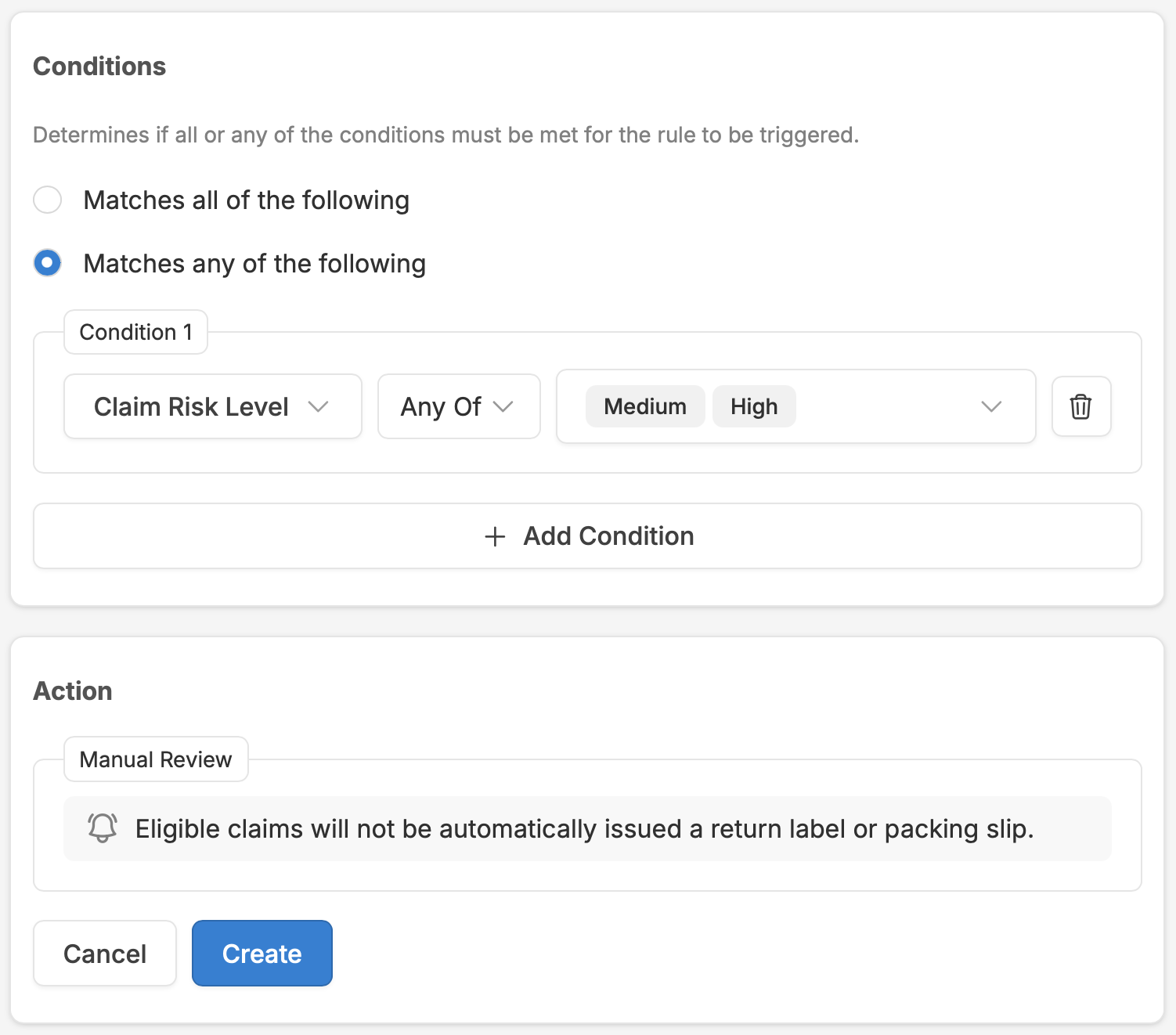
Same system, same rules. Claim Risk scores plug into the same automation rules, the same workspace, and the same filter views the merchant already uses. There's no separate fraud tool, no different admin interface, no new set of rules to learn. The merchant adds risk-based conditions to their existing rules and the fraud response is live.
In Practice
A flagged claim, from submission to resolution.
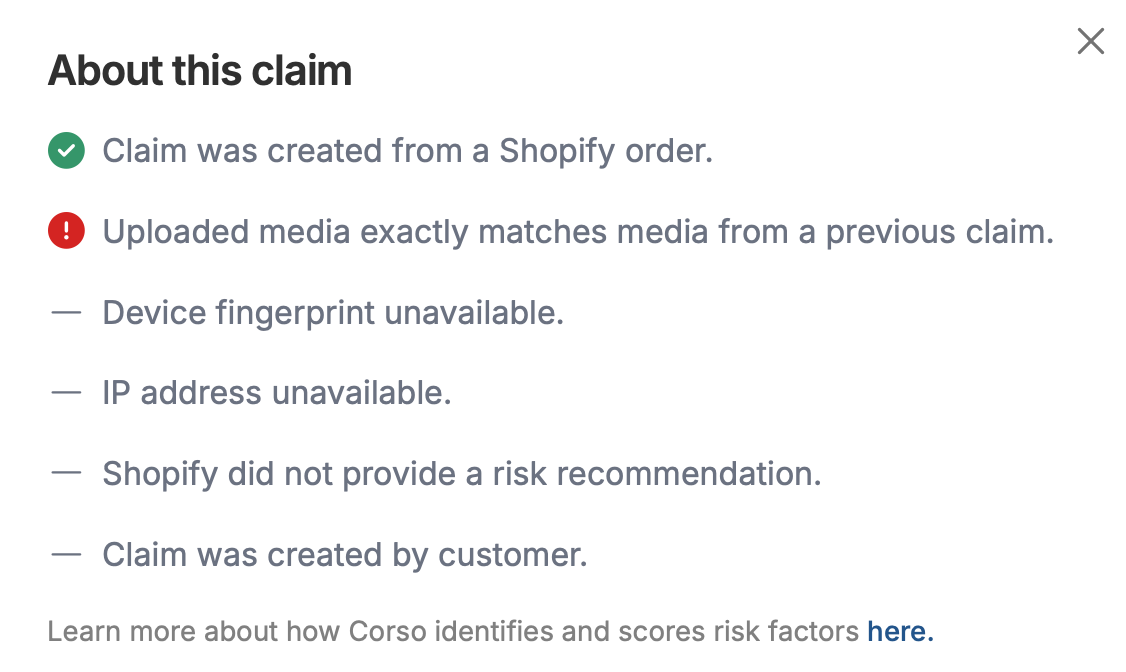
Here's what happens when a customer submits a claim that Claim Risk identifies as suspicious. The workflow is fully transparent. Every signal, every score, and every action is visible in the admin.

Claim Submitted
Customer submits a return claim through the portal. The claim enters the system like any other. The customer experience is identical regardless of risk level. No checkout friction, no visible gates.
Claim Risk Evaluates
Before the claim reaches the merchant's team, Claim Risk analyzes all five signal categories: email behavior, device fingerprints, IP patterns, media reuse, and cross-claim history. The composite risk score is calculated.
Automation Rules Fire
The merchant's automation rules evaluate the claim. If the risk score triggers a Manual Review rule, auto-finalization is paused. If it triggers a Tag Claim rule, fraud tags are added. The claim enters the review queue.
Risk Signals Visible
The reviewer opens the claim in the Claims Processing workspace. They see the risk score, the contributing signal indicators, the Customer Claim Visibility view, and any media reuse flags.
Reviewer Decides
Based on the signals and customer history, the reviewer approves, modifies, or denies the claim. They can add internal notes, adjust the resolution, or add tags for tracking. The decision is logged.
Resolution & Learning
The claim is finalized. The resolution outcome becomes part of the customer's claim history. Future claims from this customer will include this outcome in the Claim Risk evaluation. The system builds a richer picture with every resolved claim.
What about false positives? Not every high-risk score means fraud. A customer traveling internationally might trigger IP inconsistency flags. A new email might be flagged simply because it's new. The scoring surfaces risk; it doesn't make the decision. The merchant's team reviews the signals and makes the call. This is why Corso's approach is "ML-driven scoring, rules-based response" rather than "AI auto-deny."
Next Steps
Continue exploring.
Exchanges & Revenue Retention
Shop Now, Instant Exchanges, Advanced Exchanges, incentive mechanics, Returns Ledger.
Automation & Workflows
Rules engine, cookbook recipes, claim processing workspace, eligibility controls.
Self-Service Portal
Branded portal, order lookup, customization, claim flow, shipping, gift returns.
Returns & Exchanges
Full overview of Corso's returns and exchange capabilities.
See your risk profile.
Book a demo to walk through Claim Risk with your historical claim data, your customer segments, and your risk tolerance thresholds. The same scoring engine evaluates warranties and shipping claims, so your fraud signal base grows with every Corso capability you add.