

Automation & Workflows
Rules for the routine,
humans where it counts.
Corso's rules engine handles approvals, routing, fees, label generation, restocking, tagging, and flagging, all based on configurable conditions across product, customer, order, and claim attributes. Pre-built recipes in the Automation Cookbook cover common patterns, take them and customize them exactly how your store operates.
The Problem
Return volume scales. Team size shouldn't have to.
At low volume, every claim gets reviewed by a person. At scale, that model breaks. Corso's automation system moves claims along through the whole process (approvals, labels, fees, restocking, notifications) so your team only touches the claims that actually need human judgment.

Rules Engine
12+ automation rule types, each with multi-dimensional conditions across product, customer, order, and claim attributes. Rules fire throughout the claim lifecycle: submission, finalization, shipment, inspection.
Learn more below ↓
Eligibility
Before automation rules fire, eligibility determines what a customer can do. Return windows, exchange eligibility, store credit availability, final-sale enforcement. All configurable.
Learn more below ↓
Cookbook
Pre-built recipes for the most common return policies get automation running in minutes. Pick the recipe that matches your operation, customize the conditions, and activate.
Learn more below ↓
Workspace
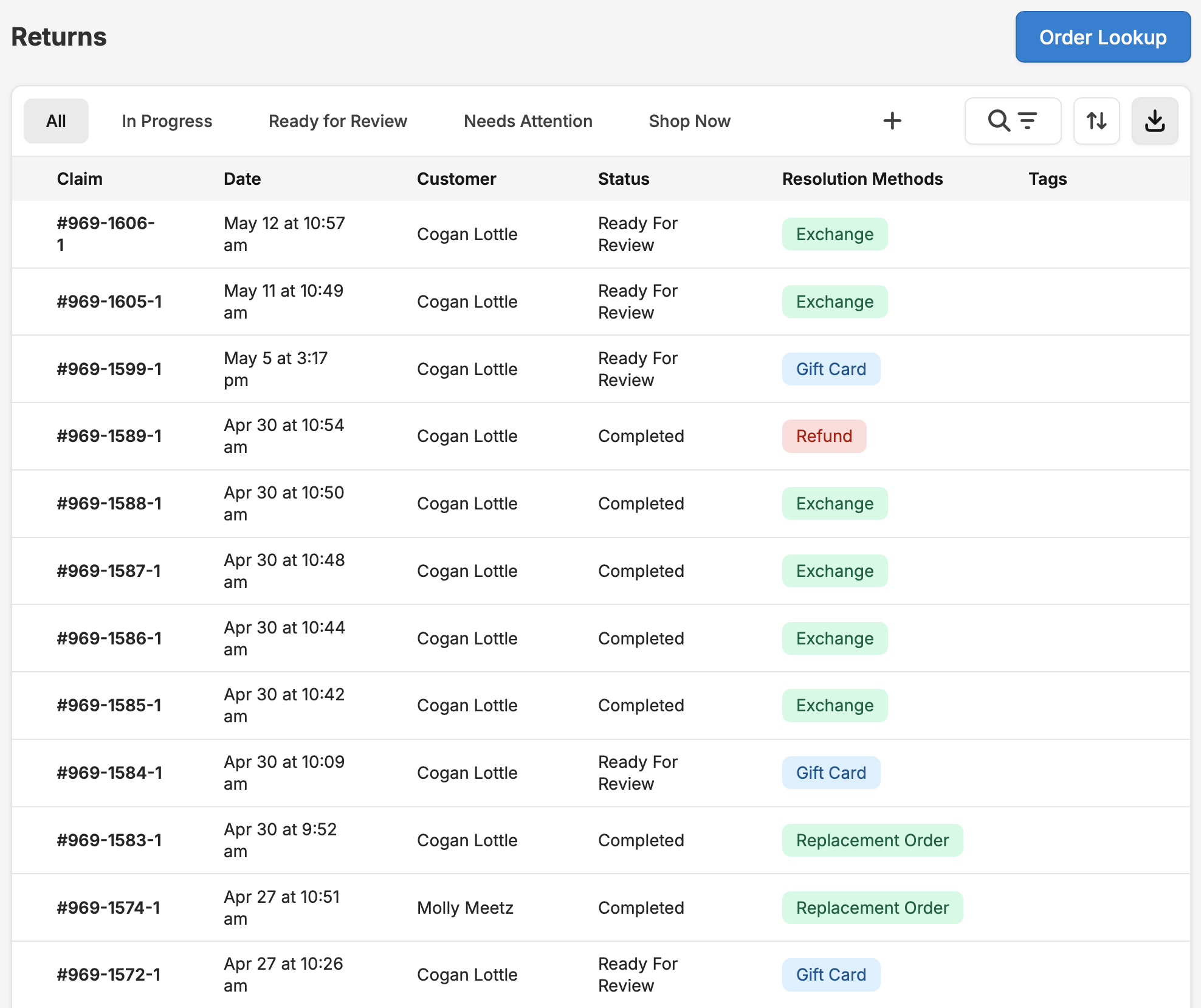
The Claims Processing workspace handles everything automation flags for review. Unified claim view, saved filter queues, inspections, manual overrides, and CSV export.
Learn more below ↓
Rules Engine
Every rule type, every condition, every action.
Automation rules fire at specific points in the claim lifecycle. Each rule has conditions (when should this trigger?) and actions (what should happen?). Conditions can combine product attributes, customer information, order details, claim data, and return reasons. Every rule is visible, auditable, and editable.
Claim Processing Rules
Auto-Finalization
Closes claims automatically when conditions are met.
"Auto-approve all variant exchange claims under $75 when return tracking shows delivered."
Manual Review
Flags the claim for human review and pauses processing.
"Flag for manual review if claim value exceeds $200 or if return reason is 'item not as described' on electronics."
Return Shipping Policy
Routes return shipments and chooses the label format.
"Route 'defective' returns to the QA warehouse with a prepaid label. Route 'changed my mind' returns to the main warehouse with a packing slip."
Charge for Return Label
Bills the customer for the return shipping label.
"Charge $7.95 for return labels on refund claims. Free labels on exchange claims."
Charge for Exchange Shipping
Bills the customer for shipping on the exchange order.
"Free exchange shipping for VIP customers. Standard rate for all others."
Instant Exchange
Ships the replacement before the original is returned.
"Offer instant exchanges on VIP claims with a 7-day pre-authorization hold on the original."
Claim Modification Rules
Apply or Waive Fee
Adds or removes a fee on the claim.
"15% restocking fee on refund claims for opened electronics. No fee on exchanges."
Gift Card Incentive
Adds a bonus to the gift card amount.
"VIP customers get +15% bonus on Shop Now credit. Sale items get no bonus."
Restock Inventory
Controls how returned items restock and where they go.
"Restock as 'available' if inspection passes. Restock as 'damaged' if grade is C or below. Don't restock hygiene items at all."
Tag Claim
Adds Corso claim tags for internal routing and reporting.
"Tag as 'high-value' if claim total exceeds $150. Tag as 'repeat-returner' if customer has 3+ claims in 90 days."
Tag Order
Adds Shopify order tags based on claim events.
"Add 'return-in-progress' tag when claim is created. Replace with 'return-complete' when finalized."
Collect Additional Information
Shows custom fields or upload prompts to the customer.
"Require photo upload if return reason is 'damaged.' Show sizing acknowledgement if reason is 'wrong size.'"
Policy Enforcing Questions
Adds yes/no gating questions to the return flow.
"'Has the item been worn or washed?' → Yes = ineligible. No = continue."
Customize Claim Inspections
Adjusts inspection workflow per claim.
"Require photo inspection on electronics returns. Skip inspection on apparel under $50."
Configure Out Of Stock
Sets fallback behavior when an exchange item is unavailable.
"If replacement size is out of stock, automatically convert to store credit with a +10% bonus."
The condition library
Every rule type draws from the same pool of conditions. Conditions can be combined with AND/OR logic. Multiple rules can fire on the same claim, executing in priority order.
Eligibility
Customize your CX to the individual
Before automation rules fire, eligibility rules decide which items can be returned, which resolution types are available, and which products are final sale. Default windows cover most cases, and per-product, per-collection, and per-customer overrides handle the rest exactly as you define them.
Default Return Windows
Baseline return window (e.g., 30 days from delivery). Separate windows for refunds, store credit, and exchanges. A merchant might allow exchanges for 60 days but refunds for only 30.
- Resolution-specific windows for refunds, store credit, and exchanges
- Partially fulfilled order handling: allow or block claims on orders that haven't fully shipped
- Return expiration: time limit for customers to ship items after label generation
Product & Collection Overrides
Override default windows for specific products, tags, or collections. Mark items ineligible by product tag, SKU, collection, discount code, or gift card status.
- Final sale enforcement by product tag, SKU, collection, or discount code
- Products missing a Shopify product ID are automatically ineligible
- Shipping protection line items excluded from return eligibility automatically
Customer & Order Conditions
Eligibility rules can key off customer tags, order tags, financial status, fulfillment status, and order age.
- VIP-specific policies: extended return window for loyalty-tier customers
- Segment-specific restrictions based on customer tags or order history
Dynamic Eligibility (Automation-Driven)
Policy-enforcing questions that dynamically change eligibility mid-flow. "Collect Additional Information" rules that gate submission on required uploads or acknowledgements.
- Claim inspections that evaluate eligibility post-submission based on item condition
- Admin eligibility overrides: reset or change item eligibility after a claim has been submitted
Before the claim starts: Corso's Order Eligibility view shows merchants exactly what each line item is eligible for, before a customer even initiates a return. Refund? Exchange? Store credit? Ineligible? And why. This is the merchant's preview of what the customer will see.
Cookbook
Start with a recipe. Customize from there.
The Automation Cookbook includes pre-built recipes for the most common return policies. Each recipe is a complete automation rule set with conditions, actions, and priority order, ready to activate. Pick the one that matches your policy, adjust the conditions, and go live.
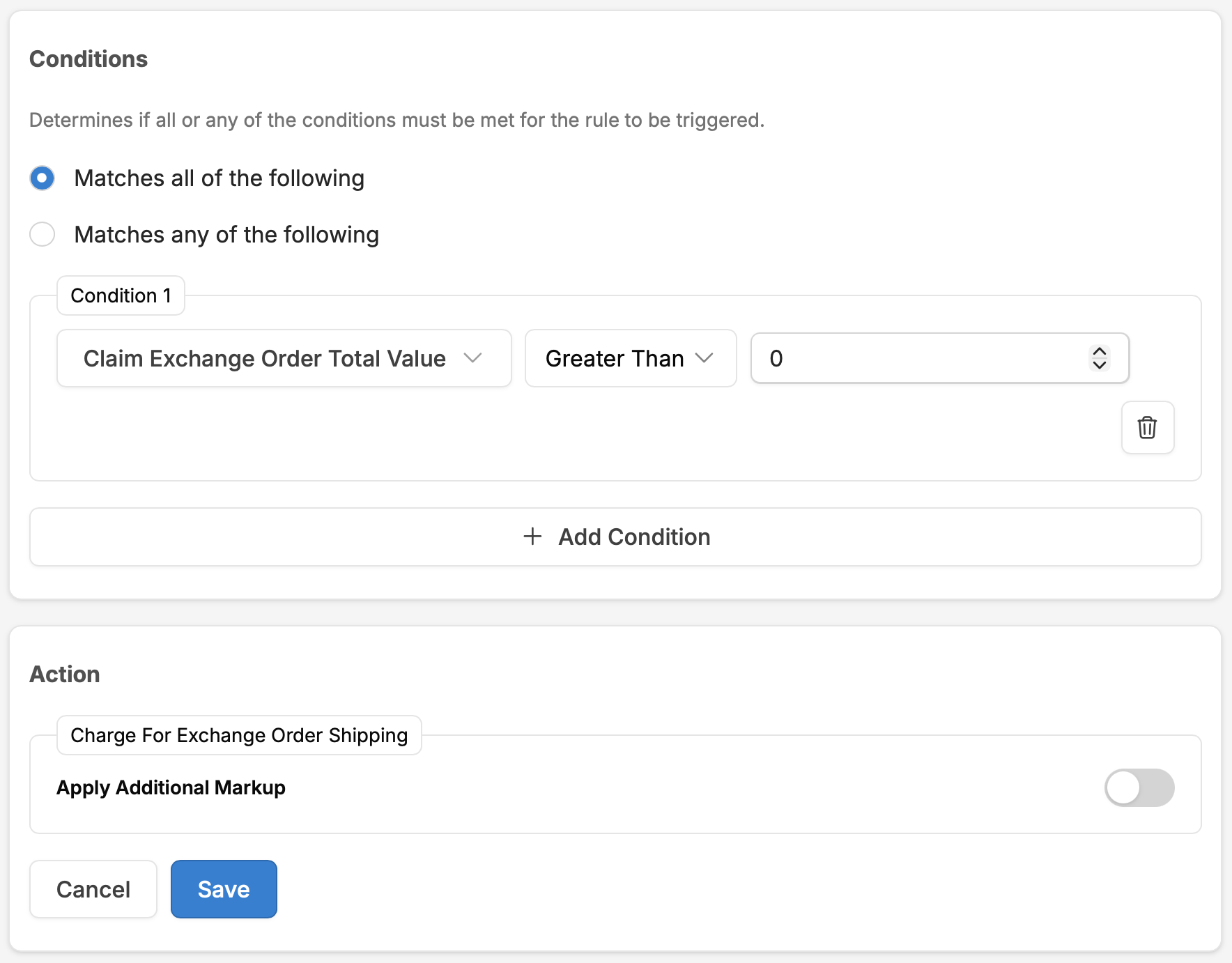
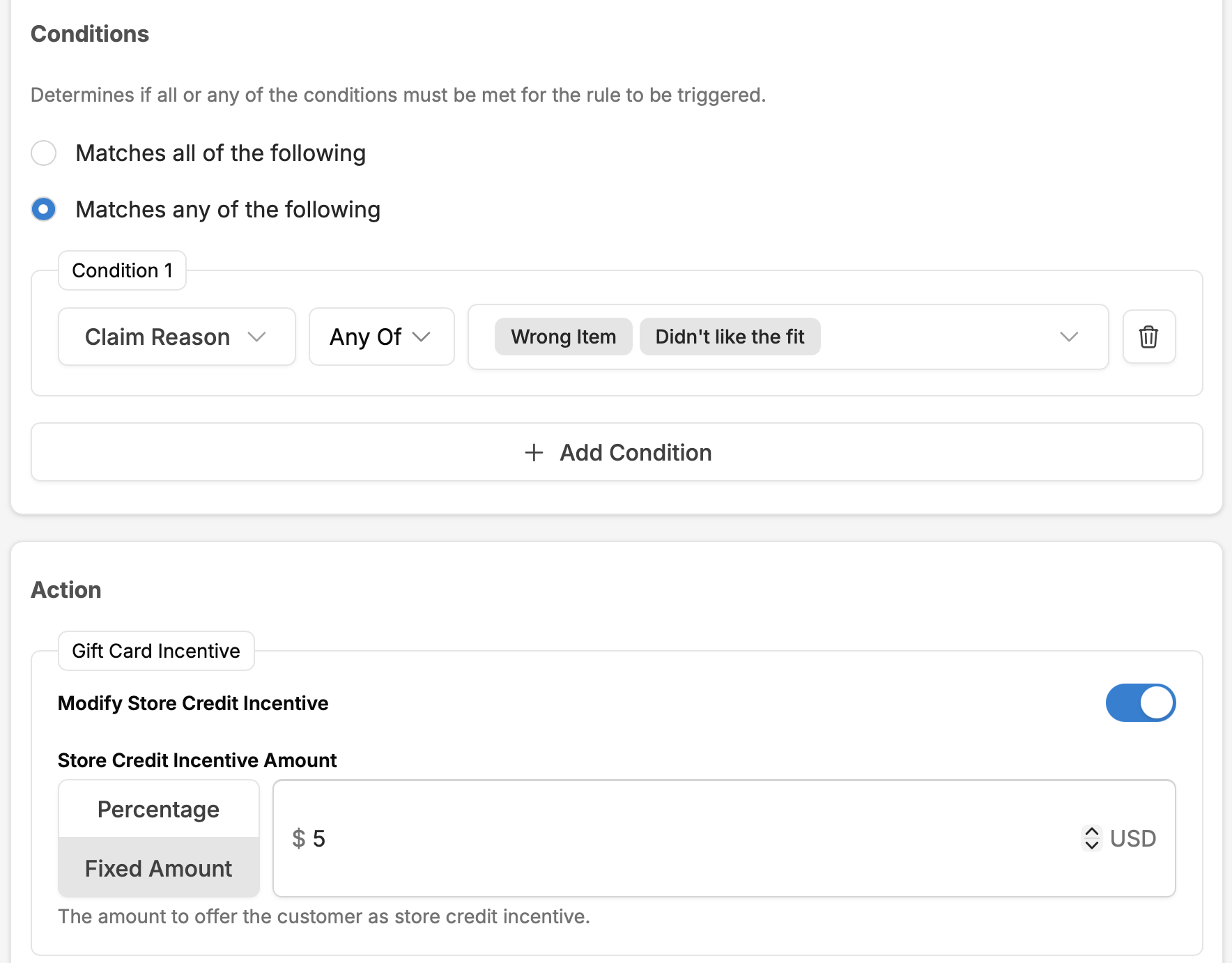
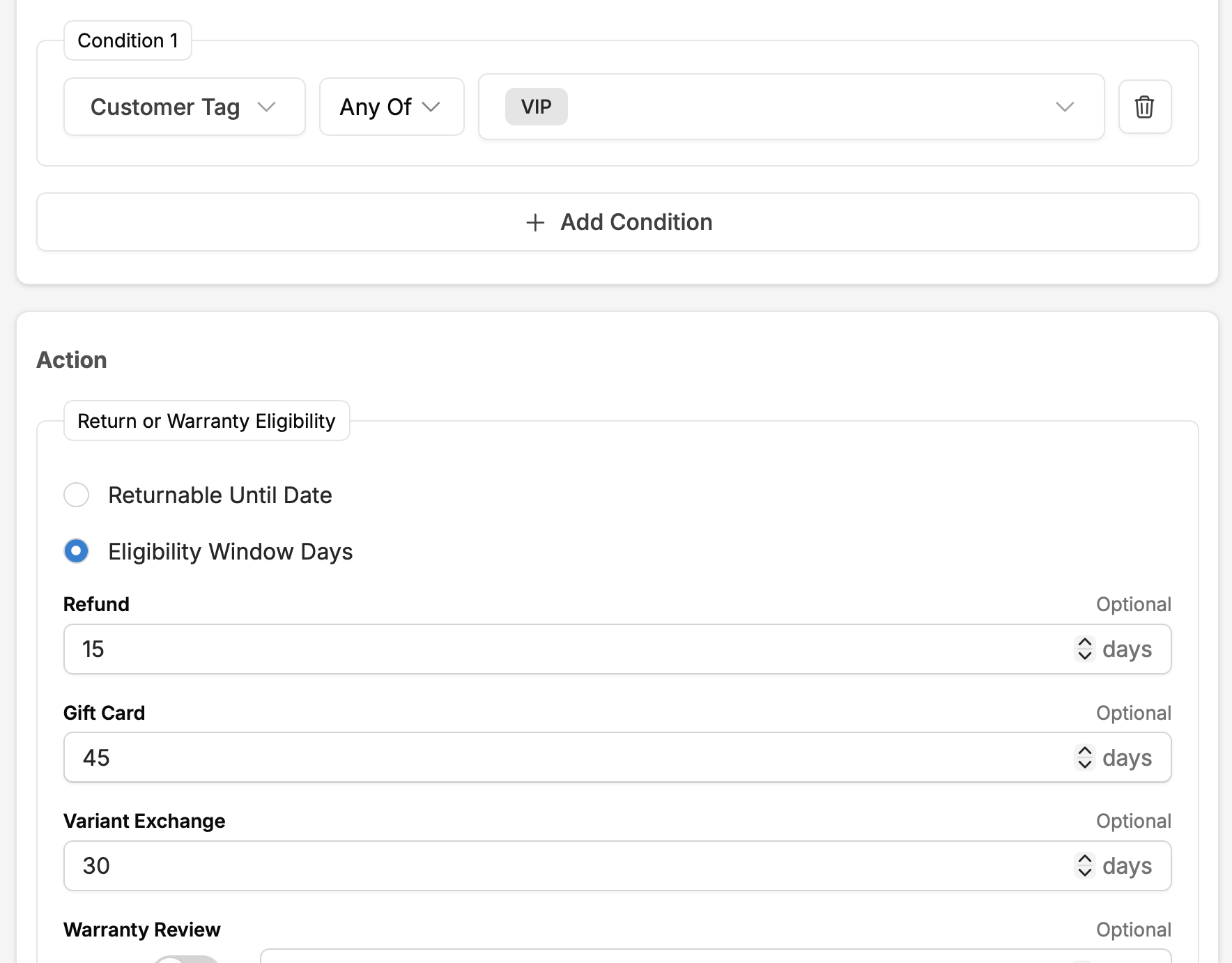
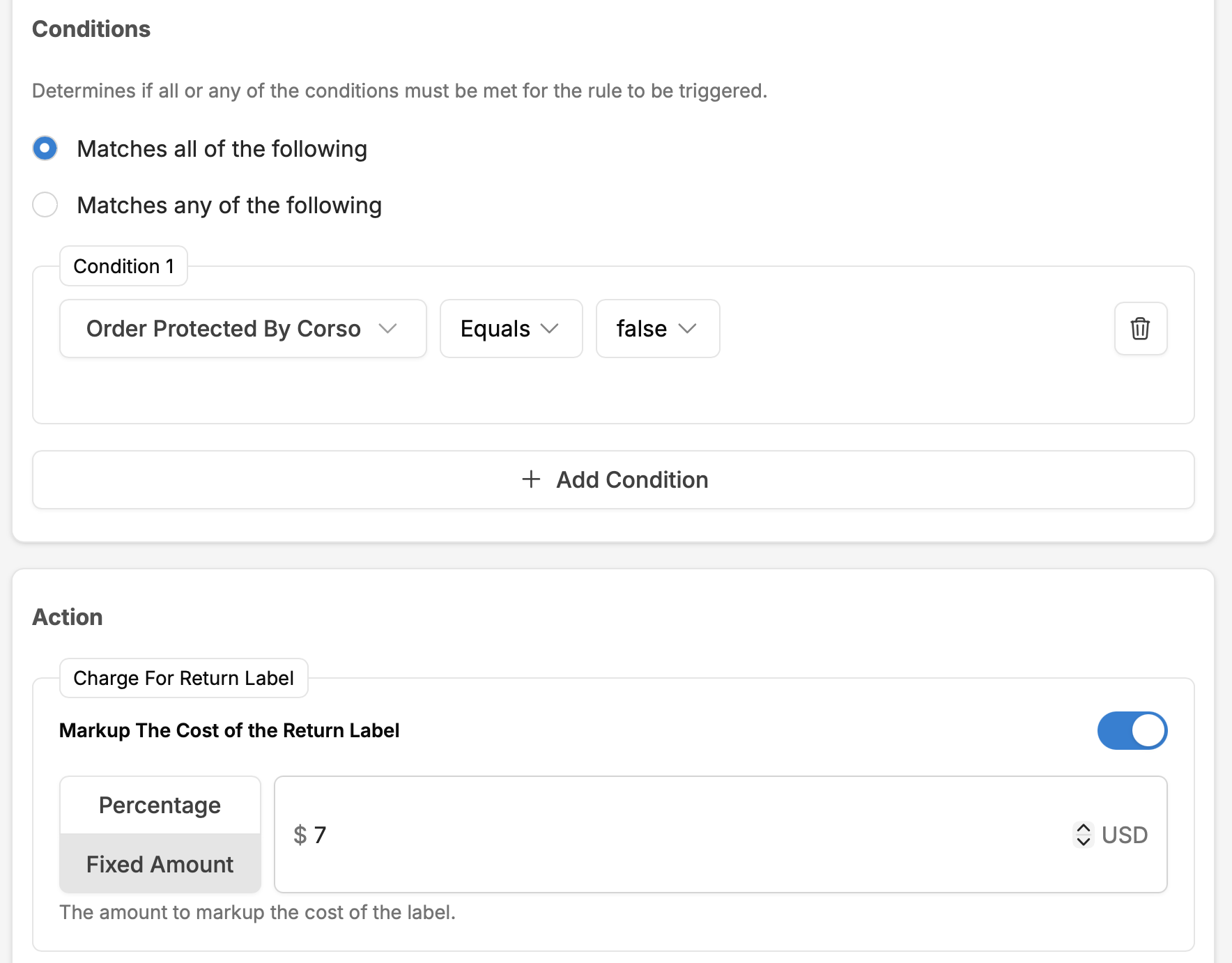
Recipes are starting points. Every recipe can be modified: add conditions, change thresholds, swap actions. Merchants who outgrow recipes can build custom rules from scratch using the full condition library. The Cookbook gets you running in minutes; the rules engine handles everything else.
Processing
When humans are needed, make them fast.
Not every claim can be automated. High-value items, suspicious patterns, ambiguous return reasons, inspection-required products: some claims need a person. Corso's Claims Processing workspace puts everything on one screen, and configurable inspections ensure consistent evaluation standards.
Workspace
Claims Processing Workspace
-
Unified Claim View
One page for reviewing, inspecting, approving, modifying, or denying line-item requests. Claim history, customer context, automation tags, and resolution options are all visible without switching between screens.
-
Claim Editing
Change resolutions, amounts, customer details, tags, fees, and notes before finalization. Add internal notes. Attach files. Override automation decisions when needed.
-
Manual Claim Creation
Create claims on behalf of customers from the admin, for phone or email requests that don't come through the portal. Same automation rules apply.
-
Saved Filter Views
Reusable filtered views shared across the team. "High-value review queue." "Flagged by Claim Risk." "Electronics returns awaiting inspection." Each team member sees the queue that matters to them.
-
CSV Export
Export filtered claims, columns, and custom-field responses for external analysis, accounting, or reporting. Configurable export templates.
Inspections
Claim Inspections
-
Custom Questions
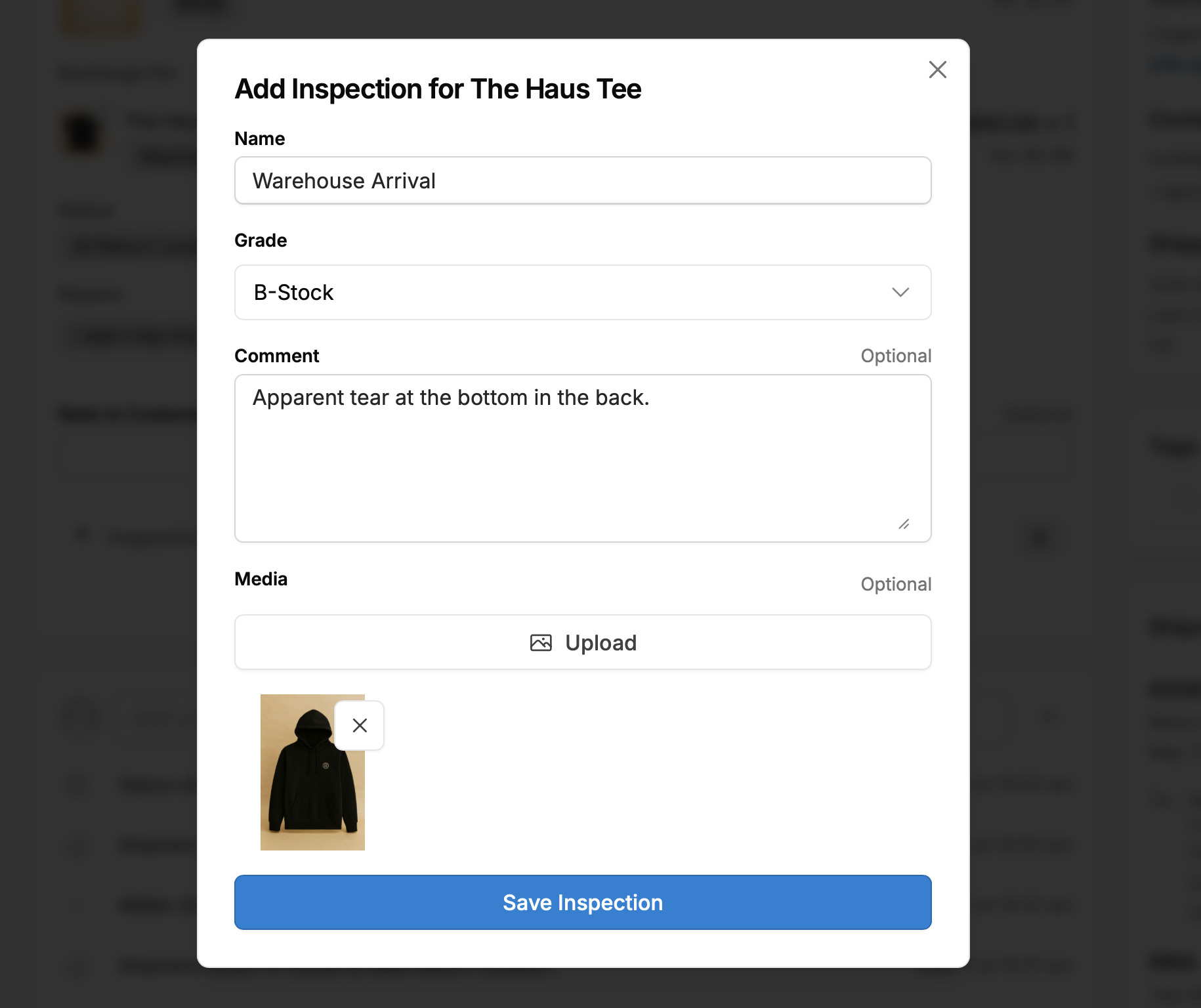
"Is the original packaging intact?" "Are all accessories included?" "Rate item condition: A/B/C/D." Merchants define the questions for their product categories.
-
Photo Requirements
Require warehouse staff to upload photos of the returned item. Photos are attached to the claim record for audit and dispute resolution.
-
Grades & Outcomes
Inspection results trigger different automation actions: restock as available, restock as damaged, deny the claim, or approve with a reduced refund.
-
Rule-Based Inspections
Inspections can be required only for specific product groups, claim values, or return reasons. Not every return needs an inspection, only the ones that do.
-
Inspector Notes
Free-form notes capture context that structured questions don't, like a faint defect or a returning customer's email. Attached to the claim record and visible in the workspace.
Inspection-to-automation feedback loop: Inspection results feed back into the automation system. A grade-A inspection auto-finalizes. A grade-C inspection triggers a reduced refund. A grade-D inspection routes to manual review. The human evaluates the item; the system takes the configured action.
Connections
Automation that reaches beyond Corso.
Claims don't exist in isolation. Exchange orders need fulfillment. Return labels need carrier integration. Flagged claims need helpdesk tickets. Corso's automation writes tags, fires webhooks, and syncs with your operational stack.
Shopify Order Tags
Tag Order automation adds Shopify tags based on claim events. Downstream systems (3PLs, helpdesk tools, Shopify Flow) can react to these tags without touching Corso.
Claim Tags for Routing
Tag Claim automation adds Corso-internal tags for routing, reporting, and queue management. Tags appear in the Claims Processing workspace and in Saved Filter Views.
Exchange Order Creation
Exchange orders are created through Shopify's Returns API. The exchange appears as a standard Shopify order with a configurable discount code, credit application, and price-difference charge. Native Shopify accounting, no reconciliation needed.
Webhook Events
Corso fires signed webhooks for claim lifecycle moments: new claim submitted, claim details updated, claim finalized, shipping claim updates, and return registration created. External systems can listen and react.
Helpdesk Integration
Zendesk, Gorgias, Kustomer, Gladly, and Zowie integrations surface claim data directly in support tickets. Agents see claim status, automation history, and resolution options without leaving their helpdesk.
WMS & Carrier Integration
ShipBob, ShipHero, Logiwa, Blue Box, and Two Boxes receive return routing and restock instructions. EasyPost and Vesyl handle label generation, rate lookup, and carrier selection. Return Shipping Policy automation determines which carrier, rate, and destination for each return.
Next Steps
Continue exploring.
Exchanges & Revenue Retention
Shop Now, Instant Exchanges, Advanced Exchanges, incentive mechanics, Returns Ledger
Self-Service Portal
Branded portal, order lookup, customization, shipping and label options, gift returns
Fraud & Risk Protection
Claim Risk scoring, serial returner detection, cross-claim visibility
Returns & Exchanges
Full overview of Corso's returns and exchange capabilities
See automation tailored just for your workflow.
Book a demo to walk through automation setup with your return policies, your product catalog, and your operational requirements. Protection revenue can fund the CX team time that automation frees up.